
Bouncer /
Connecting with Smuxi
Smuxi is an open-source IRC client that runs on Windows, Mac, and Linux.
- From the menu bar, select
Server→Add.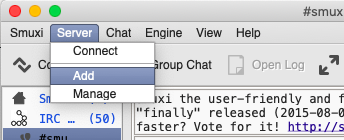
- Fill in the details:
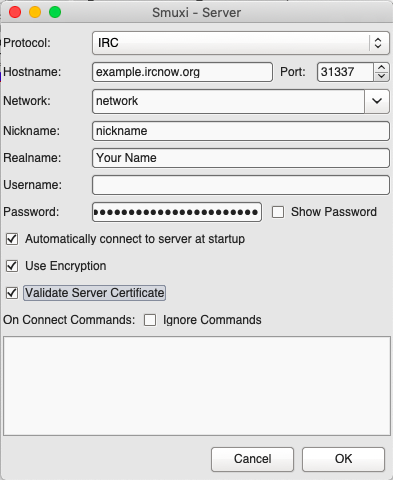
Hostname: fill in the bouncer server address (it should look like example.ircnow.org)Port: 31337Network: fill in the name of the network you want to connect toNickname: fill in the bouncer usernamePassword:username/network:password-- For example, if your username isjohn, the network you want to connect to isircnow, and your password isabcde12345, then fill injohn/ircnow:abcde12345.- Check
Automatically connect to server at startup - Check
Use Encryption - Check
Validate Server Certificate - Click
OK.
- From the menu bar, select
Server→Connect.
- Click
Connectat the bottom-right corner.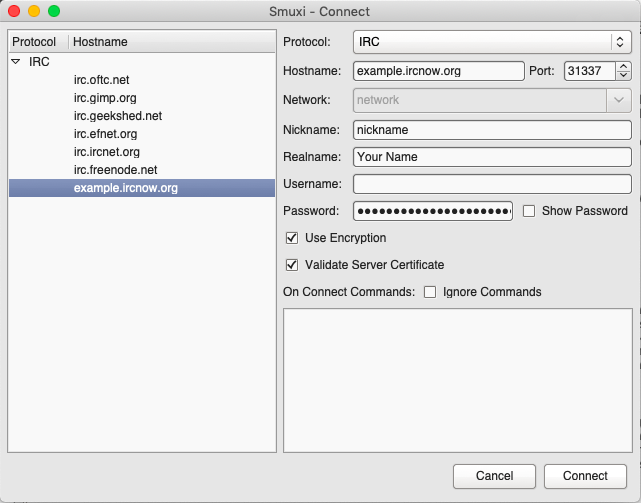
- If you see a message saying ZNC is not yet connected to the network, type
/znc connect-- wait a few minutes to connect.