
Faster ZNC connects: a prebuilt oidentd file instead of identfile
If your bouncer gives every user their own IPv6 address (a BindHost), you don't need ZNC's identfile module. A small script can write all users' idents into ~znc/.oidentd.conf ahead of time. oidentd then answers each user from the address they connect from, and ZNC can connect everyone at once instead of one at a time.
On ircforever this cut the time to reconnect everyone after a ZNC restart from about two hours to about ten minutes.
This page assumes oidentd is already set up for ZNC as in Configuring oidentd for ZNC: oidentd is running, and /etc/oidentd.conf lets the znc user spoof.
Why identfile is slow
When an IRC server accepts a connection it usually asks the connecting host "who owns this connection?" over the ident protocol (port 113). On a shared bouncer every connection belongs to the system user znc, so oidentd needs to be told which ZNC user each one is for.
The identfile module does this by rewriting one file for every connection:
- A network starts connecting. identfile takes an exclusive lock on
~/.oidentd.confand writesglobal { reply "alice" }. - The server checks ident and oidentd answers
alice. - identfile keeps the lock until the server has fully registered the connection (the welcome message), or the connection fails.
While the lock is held, every other network that tries to connect is aborted with:
Aborting connection, another user or network is currently connecting and using the ident spoof file
It retries later. So connections happen strictly one after another, and each one waits for the previous server's whole registration: the TCP and TLS handshake, the server's own DNS and ident checks, and any slow or far-away network. With a few dozen users that adds up quickly. After a restart, or after the box's network drops, users sit at "Disconnected" for a long time, and one slow network holds up everyone behind it.
The fix: one file, written ahead of time
oidentd can choose its reply by the local address a connection comes from:
from 2001:db8:1::a { reply "alice" }
from 2001:db8:1::b { reply "bob" }
If each user has their own BindHost, that address already identifies the user. So instead of rewriting the file per connection, a script reads every BindHost in znc.conf and writes all the from lines at once. Nothing needs a lock any more, and ZNC connects users in parallel. The only spacing left is ZNC's own ConnectDelay and ServerThrottle.
The script:
- reads every
BindHostinznc.conf, at both user level and network level - resolves hostnames to their IPv6 and IPv4 addresses (literal addresses are used as they are)
- drops any address used by more than one user, because ident can't tell those users apart
- writes
global { reply "znc" }followed by onefromline per address, then swaps the new file into place - refuses to replace the file if fewer than
MINmappings resolved, so a DNS failure can't wipe everyone's ident
Users without an address of their own (or sharing one) get the global reply, znc.
Results
From ZNC's adminlog on ircforever (OpenBSD, ZNC 1.9.1, ConnectDelay = 1, ServerThrottle = 30, the same settings before and after), counting how many networks were connected again after a ZNC restart:
| identfile (June 2026) | prebuilt file (August 2026) | |
|---|---|---|
| Networks connected 5 minutes after restart | 5-10 | 131-141 |
| Half of the networks connected | ~70 minutes | 4-6 minutes |
| 90% of the networks connected | ~2 hours | 8-9 minutes |
There were more users in August than in June, and it was still about ten times faster.
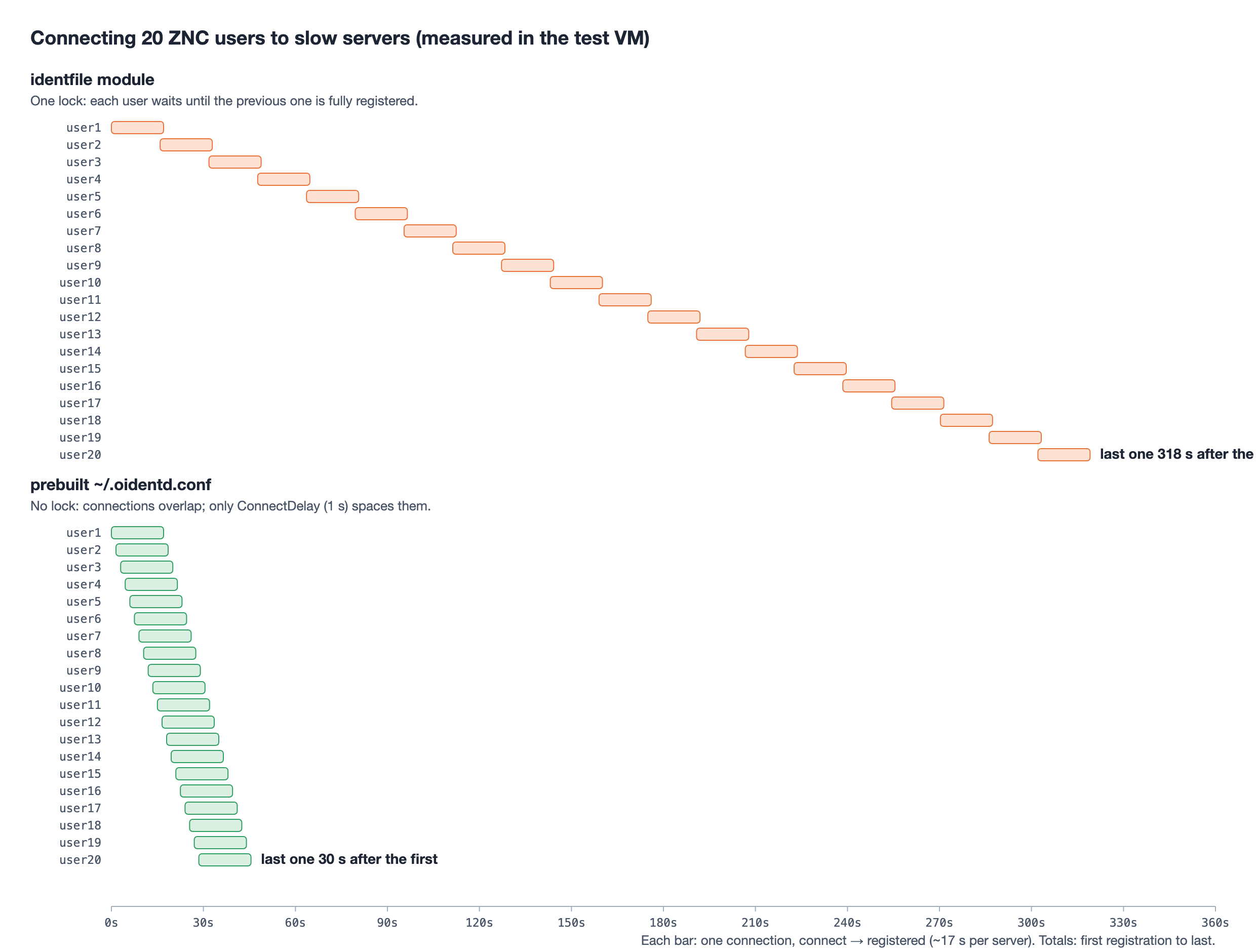
To check that the speedup came from the ident change and not from something else, I reproduced it in an OpenBSD 8.0 VM:
- Setup: 20 ZNC users, each with its own IPv6 BindHost, connecting to an ngircd server that does ident lookups.
- Slow servers: registration was slowed to about 17 seconds per connection, like a slow real-world network.
- identfile: the users registered one at a time, 318 seconds from the first to the last.
- Prebuilt file: all 20 registered within 30 seconds, each with the correct ident.
Setting it up
1. Check each user has their own address
Every user who should get their own ident needs a BindHost that no other user shares, usually an IPv6 address from your /64 with a matching hostname. See how many you have:
$ doas grep -c "BindHost = " /home/znc/home/znc/.znc/configs/znc.conf
If your znc.conf is somewhere else, find it with doas find /home/znc -name znc.conf and use that path below (the script takes it as CONF=).
2. Install the script
Save this as /usr/local/sbin/znc-gen-oidentd. The settings at the top match the layout from Install ZNC from Source and Configuring oidentd for ZNC: ZNC runs as znc chrooted in /home/znc, and /home/znc/.oidentd.conf is a symlink to /home/znc/home/znc/.oidentd.conf.
#!/bin/sh
# znc-gen-oidentd -- build ZNC's ~/.oidentd.conf from the BindHosts in znc.conf,
# so oidentd answers every user's ident without ZNC's identfile module.
#
# Each address that belongs to exactly one ZNC user gets
#     from <address> { reply "<user>" }
# Addresses shared by several users are left out and get the global reply.

CONF=${CONF:-/home/znc/home/znc/.znc/configs/znc.conf}	# ZNC's config
OUT=${OUT:-/home/znc/home/znc/.oidentd.conf}	# ~/.oidentd.conf of the user ZNC runs as
OWNER=${OWNER:-znc}			# that user
DEFAULT=${DEFAULT:-znc}			# reply for everyone without an address of their own
MIN=${MIN:-1}				# refuse to install a file with fewer mappings than this

TMP=$(mktemp -d /tmp/znc-gen-oidentd.XXXXXXXX) || exit 1
trap 'rm -rf "$TMP"' EXIT

# "<user> <bindhost>" for every user-level and network-level BindHost
awk '
/^<User /                  { u = $2; sub(/>$/, "", u) }
/^[ \t]*BindHost[ \t]*=/   { sub(/^[^=]*=[ \t]*/, ""); if ($0 != "") print u, $0 }
' "$CONF" | sort -u > "$TMP/binds"

# "<address> <user>": literals as they are, hostnames resolved to AAAA and A
while read -r user host; do
	case "$host" in
	*:*)		echo "$host $user" ;;
	*[!0-9.]*)	for ip in $(dig +short +time=3 +tries=2 AAAA "$host"; dig +short +time=3 +tries=2 A "$host"); do
				case "$ip" in *:*|[0-9]*.[0-9]*.[0-9]*.[0-9]*) echo "$ip $user" ;; esac
			done ;;
	*)		echo "$host $user" ;;
	esac
done < "$TMP/binds" | sort -u > "$TMP/map"

# keep addresses that belong to exactly one user
awk '{ n[$1]++; line[$1] = $0 } END { for (a in n) if (n[a] == 1) print line[a] }' \
	"$TMP/map" | sort -k2 > "$TMP/uniq"

count=$(wc -l < "$TMP/uniq" | tr -d ' ')
if [ "$count" -lt "$MIN" ]; then
	echo "znc-gen-oidentd: only $count mappings (MIN=$MIN), keeping the old $OUT" >&2
	exit 1
fi

{
	echo "# Generated by znc-gen-oidentd from $CONF; changes here are overwritten."
	echo "global { reply \"$DEFAULT\" }"
	while read -r ip user; do
		printf 'from %s { reply "%s" }\n' "$ip" "$user"
	done < "$TMP/uniq"
} > "$OUT.new" || exit 1

chown "$OWNER" "$OUT.new" && chmod 644 "$OUT.new" && mv "$OUT.new" "$OUT" || exit 1
echo "znc-gen-oidentd: wrote $count mappings to $OUT"
$ doas chmod 755 /usr/local/sbin/znc-gen-oidentd
If you installed ZNC from OpenBSD packages instead, it runs as _znc with its data in /var/znc, and that user's home is /nonexistent. oidentd looks for ~/.oidentd.conf, so give _znc a real home and point the script there:
$ doas usermod -d /var/znc _znc
Then use CONF=/var/znc/configs/znc.conf, OUT=/var/znc/.oidentd.conf and OWNER=_znc, and allow spoofing for user _znc in /etc/oidentd.conf.
3. Run it
$ doas env MIN=10 /usr/local/sbin/znc-gen-oidentd
znc-gen-oidentd: wrote 80 mappings to /home/znc/home/znc/.oidentd.conf
$ doas head -4 /home/znc/home/znc/.oidentd.conf
# Generated by znc-gen-oidentd from /home/znc/home/znc/.znc/configs/znc.conf; changes here are overwritten.
global { reply "znc" }
from 2001:db8:1::a { reply "alice" }
from 2001:db8:1::b { reply "bob" }
All settings can be given like this (doas env NAME=value ...; doas itself doesn't accept NAME=value before a command). Set MIN a little below the number of users who have their own address. If DNS is down and fewer than that resolve, the script keeps the old file instead of installing a nearly empty one.
oidentd reads ~/.oidentd.conf fresh for every query, so it doesn't need a restart.
4. Turn off identfile
While identfile is loaded it will keep overwriting the file. From an IRC client connected to ZNC as an admin:
/msg *status unloadmod --type=global identfile
/msg *status saveconfig
Check that the LoadModule = identfile line is gone:
$ doas grep -c "LoadModule = identfile" /home/znc/home/znc/.znc/configs/znc.conf
0
5. Keep it up to date
The file only changes when the script runs. Run it from root's crontab every night:
$ doas crontab -e
30 4 * * * MIN=10 /usr/local/sbin/znc-gen-oidentd
Also run it right after adding a user or changing someone's BindHost. Until then, that user gets the global znc reply. If you create users with a script or bot, add a call to znc-gen-oidentd at the end of it.
6. Check it works
Watch oidentd answer as users connect:
$ doas tail -f /var/log/daemon | grep oidentd
oidentd[82791]: [2001:db8::6667] Successful lookup: 38604 , 6697 : znc (alice)
The name in brackets is the reply. On IRC, /whois a user: their ident should have no ~ in front of it.
Things to watch out for
- A bad
/etc/oidentd.confstops oidentd completely. If auserblock names an account that no longer exists, oidentd logsError parsing configuration file, exits, and nobody gets an ident until it is fixed. Check the file after every edit:
$ echo 1,1 | doas /usr/local/sbin/oidentd -I -S
[line 7] Invalid user: "olduser"
Error reading configuration file
No output (exit status 0) means the file is fine. This only reads the config and exits; it doesn't touch the running oidentd. After fixing the file, start oidentd again with the command from /etc/rc.local. It's also worth having your monitoring check that something is listening on port 113.
- Shared addresses get the global reply. Users who share an address can't be told apart by ident, so the script leaves them out on purpose.
- Don't run OpenBSD's own identd. It takes port 113 away from oidentd (see the notice on Configuring oidentd for ZNC).
- IPv4: if users connect over the box's shared IPv4 address, they all come from the same address and get the global reply. Per-user idents need per-user addresses, which in practice means IPv6.