
VictoriaMetrics, node_exporter and Grafana on OpenBSD
This guide sets up a single-host monitoring stack on OpenBSD using packages only:
- node_exporter exposes the host's CPU, memory, disk and network metrics
- VictoriaMetrics scrapes and stores those metrics (a drop-in for Prometheus)
- Grafana graphs them
Everything listens on 127.0.0.1 only, and you reach Grafana through an SSH tunnel. No ports are opened to the world.
Tested on a fresh OpenBSD 8.0 install with victoriametrics-1.119.0, node_exporter-1.12.1 and grafana-13.1.5. The same packages are built for amd64 and arm64. Run every command as root.
Why monitor?
Servers rarely break without warning. A disk fills up over a few weeks, a process slowly leaks memory until the box starts swapping, or a nightly job pins the CPU and takes the site with it. Without history you only find out once something is already broken, and then you have to guess at the cause. With a few weeks of metrics:
- You can see when it broke. The graphs show the exact minute things changed: a reboot, a traffic spike,
/vargoing from 60% to 100% overnight. - You can see why. CPU, memory, swap, disk and network sit on the same time axis. High load while the disk is 100% busy points to I/O, not CPU. Paging that keeps climbing means the box is short of RAM. A spike in network errors points at the link.
- You know your real resource use. Weeks of data show whether a VPS is oversized or about to run out, how fast a filesystem is growing, and what a normal day looks like. That makes "something is off" easy to spot.
- You get told before your users do. Alerts email you when a host stops answering, a filesystem passes 90%, the CPU stays pegged or the box starts swapping, and again when the problem clears.
The whole stack costs about 350M of RAM and around 1% of a CPU core (see What it needs).
How it fits together
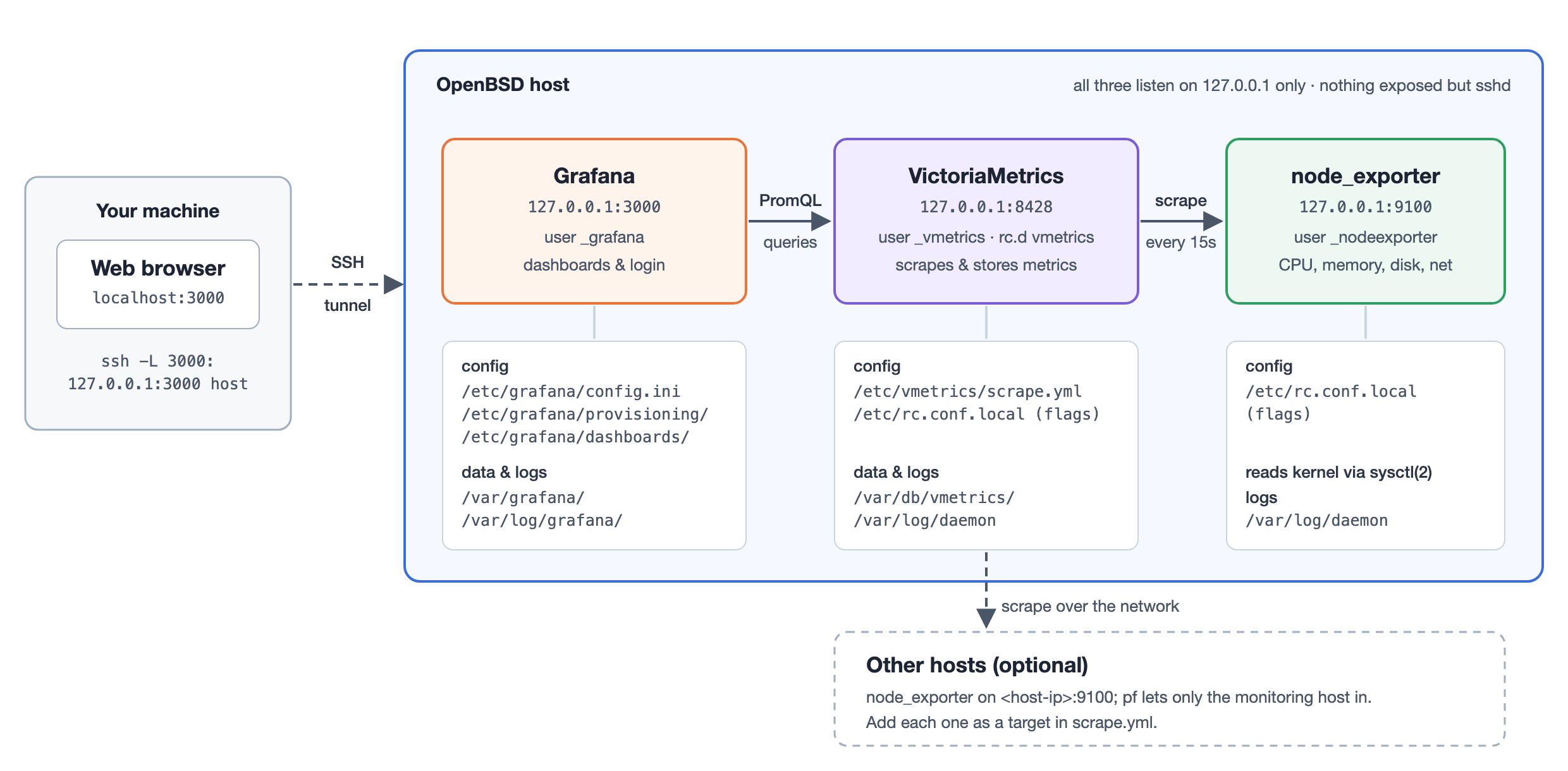
node_exporter reads the kernel's counters through sysctl(2) and serves them as text at /metrics. Every 15 seconds VictoriaMetrics fetches ("scrapes") that page and stores the samples. Grafana sends PromQL queries to VictoriaMetrics and draws the graphs. You reach Grafana through an SSH tunnel, so none of the three is exposed to the network.
| node_exporter | VictoriaMetrics | Grafana | |
|---|---|---|---|
| rc.d name | node_exporter | vmetrics | grafana |
| Listens on | 127.0.0.1:9100 | 127.0.0.1:8428 | 127.0.0.1:3000 |
| Runs as | _nodeexporter | _vmetrics | _grafana |
| Config | flags in /etc/rc.conf.local | /etc/vmetrics/scrape.yml + flags | /etc/grafana/ |
| Data | none | /var/db/vmetrics | /var/grafana |
| Logs | /var/log/daemon | /var/log/daemon | /var/log/grafana/ |
What it needs
Measured on the test VM after about 15 minutes of running, with the dashboard open:
| Memory (RSS) | CPU when idle | Installed size | |
|---|---|---|---|
| node_exporter | ~13M | <0.1% of a core | 13M |
| VictoriaMetrics | 45-120M (it sizes its caches to the RAM it finds) | ~0.3% of a core | 23M + data |
| Grafana | ~210M | ~0.6% of a core | ~900M |
| Total | ~350M | ~1% | ~1G |
- RAM: 1 vCPU and 1G of RAM is enough. I tested that size: everything started, about 190M went to swap at boot, and dashboards still loaded in about a second. 2G is comfortable.
/usr/local: Grafana needs about 1.1G free here. The default auto-layout's/usr/localon a small disk can be too small./var, Grafana: on first start Grafana downloads about 530M of "preinstalled" plugins (Elasticsearch, Zipkin, Loki, ...) into/var/grafana/plugins. You don't need them for this setup, and step 4 turns that off. Make that config change before you start Grafana the first time. Without the plugins,/var/grafanastays at a couple of MB./var, metrics: each OpenBSD host exports about 240 series. At a 15s interval that is about 1.4 million samples a day, and VictoriaMetrics' self-monitoring at 60s (step 3) adds about the same again. Budgeting about 1 byte per sample on disk, which is an estimate and not measured here, that comes to roughly 3M a day for this one host, or about 250M for 90 days. Each extra host adds about 1.4M a day.
These figures are from an Apple-silicon VM; a slower CPU will show higher percentages, but the memory and disk numbers carry over.
1. Install the packages
pkg_add victoriametrics node_exporter grafana
You can ignore the useradd: Warning: home directory `/var/db/vmetrics' doesn't exist message, because the package creates that directory itself.
The packages install three rc.d scripts: vmetrics, node_exporter and grafana. Note that the VictoriaMetrics daemon is called vmetrics on OpenBSD.
2. node_exporter
By default it listens on every interface. Bind it to localhost:
rcctl enable node_exporter
rcctl set node_exporter flags --web.listen-address=127.0.0.1:9100
rcctl start node_exporter
Check it:
ftp -o - -V http://127.0.0.1:9100/metrics | grep '^node_load'
You should see node_load1, node_load5 and node_load15.
Keep the disk numbers fresh
On OpenBSD node_exporter reads filesystem usage with getfsstat(2) without waiting, so it gets the kernel's cached figures. Those are only refreshed when something asks for fresh ones, such as df. On a stock system that means the nightly daily(8) run. In testing, writing 400M to /tmp didn't change the metric at all until df ran.
Run df every minute from root's crontab so the graphs and the "filesystem almost full" alert stay current:
(crontab -l; echo '* * * * * /bin/df >/dev/null 2>&1') | crontab -
3. VictoriaMetrics
Single-node VictoriaMetrics doesn't scrape anything until you give it a Prometheus-style scrape config:
mkdir -p /etc/vmetrics
cat > /etc/vmetrics/scrape.yml <<'EOF'
global:
  scrape_interval: 15s

scrape_configs:
  - job_name: node
    static_configs:
      - targets: ['127.0.0.1:9100']
        labels:
          instance: monitor

  - job_name: victoriametrics
    scrape_interval: 60s
    static_configs:
      - targets: ['127.0.0.1:8428']
EOF
Change instance: monitor to this host's name. That name appears in the Grafana host picker.
The victoriametrics job is VictoriaMetrics scraping its own metrics. Those are about 1,000 series, four times what a host exports, so that job runs every 60s instead of 15s to keep disk use down. Delete the job if you don't care about monitoring the monitor.
Check the file before using it. No output means it is valid:
vmetrics -promscrape.config=/etc/vmetrics/scrape.yml -promscrape.config.dryRun -loggerLevel=ERROR
Now set the flags and start it. rcctl set ... flags replaces the package's default flags, so -storageDataPath has to be repeated here:
rcctl enable vmetrics
rcctl set vmetrics flags -storageDataPath=/var/db/vmetrics -retentionPeriod=90d \
    -httpListenAddr=127.0.0.1:8428 -promscrape.config=/etc/vmetrics/scrape.yml
rcctl start vmetrics
If rcctl start prints /etc/rc.d/vmetrics: kill: ...: No such process before (ok), ignore it. It's a harmless race in rc.subr's start timer when a daemon starts very quickly.
-retentionPeriod defaults to one month. A plain number means months; d, w and y suffixes also work.
Within 15 seconds both targets should show state=up:
ftp -o - -V http://127.0.0.1:8428/targets
By default queries hide the newest 30 seconds of data (-search.latencyOffset). Give it about a minute before this returns two series with value "1":
ftp -o - -V 'http://127.0.0.1:8428/api/v1/query?query=up'
4. Grafana
Config: do this before the first start
Edit /etc/grafana/config.ini and change two lines. Under [server] (around line 48):
;http_addr =
becomes
http_addr = 127.0.0.1
Under [plugins] (around line 2006):
; preinstall_disabled = false
becomes
preinstall_disabled = true
If Grafana has already been started once, run rcctl stop grafana && rm -rf /var/grafana/plugins to get the space back.
Data source
Provision VictoriaMetrics as the default data source. Grafana talks to it with its Prometheus data source type:
cat > /etc/grafana/provisioning/datasources/victoriametrics.yaml <<'EOF'
apiVersion: 1
datasources:
  - name: VictoriaMetrics
    uid: victoriametrics
    type: prometheus
    access: proxy
    url: http://127.0.0.1:8428
    isDefault: true
EOF
Dashboard
The usual choice is "Node Exporter Full" (grafana.com ID 1860), but it is built around Linux collectors. node_exporter on OpenBSD exports a much smaller set: CPU, load, memory, swap, filesystems, disks, network interfaces and boot time. There are no meminfo, vmstat, sockstat, netstat, systemd, timex or hwmon metrics. I loaded 1860 against an OpenBSD host and only 27 of its 124 panels showed any data; the Memory Meminfo, Vmstat, Processes, Timesync, Sockstat and Netstat rows were completely empty.
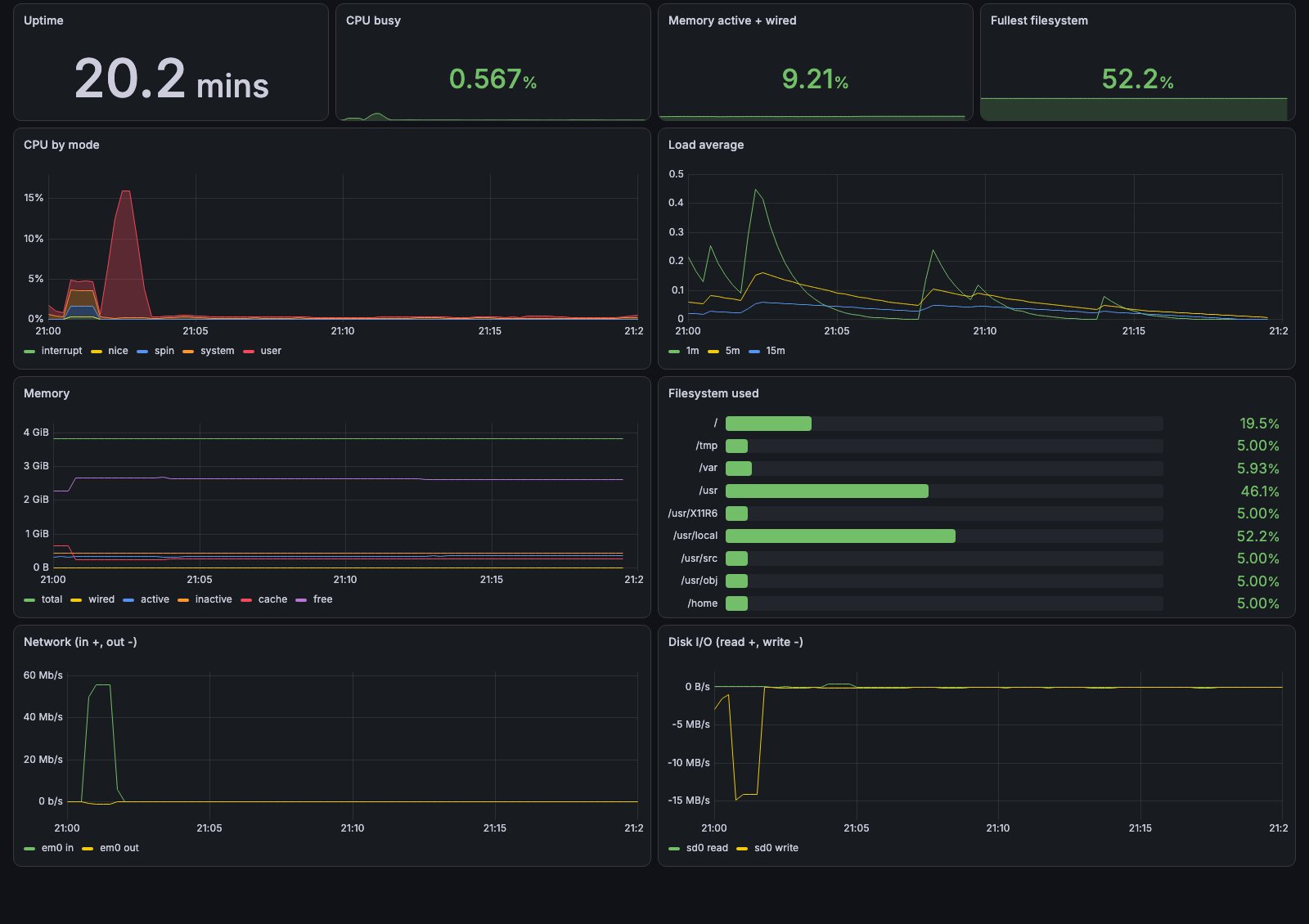
So here is an OpenBSD node dashboard laid out the same way, using only metrics that OpenBSD actually exports. All 32 of its panels have data:
- Quick CPU / Mem / Disk: gauges for CPU busy, load per core, RAM, swap, root and fullest filesystem, plus uptime, cores, RAM and swap totals
- Basic CPU / Mem / Net / Disk: CPU by mode, memory breakdown (wired/active/inactive/cache/free/swap), network traffic, filesystem usage
- CPU (collapsed): busy per core, load average against core count, CPU time by mode including
spin - Memory (collapsed): used %, swap, paging in/out
- Network (collapsed): packets, errors, drops, collisions
- Storage (collapsed): throughput, IOPS, disk busy %, free space, inodes, read-only filesystems
- Node Exporter (collapsed): collector durations and failures
If the same Grafana also watches Linux hosts, 1860 works fine for those. Import it from Dashboards → New → Import with ID 1860 and pick the VictoriaMetrics data source.
Tell Grafana to load dashboards from a directory:
cat > /etc/grafana/provisioning/dashboards/local.yaml <<'EOF'
apiVersion: 1
providers:
  - name: local
    folder: OpenBSD
    type: file
    options:
      path: /etc/grafana/dashboards
EOF
mkdir -p /etc/grafana/dashboards
Then add the dashboard:
cat > /etc/grafana/dashboards/openbsd-node.json <<'EOF'
{"uid": "openbsd-node", "title": "OpenBSD node", "schemaVersion": 39, "time": {"from": "now-6h", "to": "now"}, "refresh": "1m", "templating": {"list": [{"name": "instance", "type": "query", "refresh": 2, "datasource": {"type": "prometheus", "uid": "victoriametrics"}, "query": "label_values(node_uname_info, instance)"}]}, "panels": [
  {"type":"row","title":"Quick CPU / Mem / Disk","collapsed":false,"gridPos":{"x":0,"y":0,"w":24,"h":1},"panels":[]},
  {"type":"gauge","title":"CPU busy","gridPos":{"x":0,"y":1,"w":3,"h":4},"datasource":{"type":"prometheus","uid":"victoriametrics"},"fieldConfig":{"defaults":{"unit":"percent","min":0,"max":100,"thresholds":{"mode":"absolute","steps":[{"color":"green","value":null},{"color":"orange","value":80},{"color":"red","value":90}]}}},"targets":[{"refId":"A","expr":"100 * (1 - avg(rate(node_cpu_seconds_total{instance=\"$instance\",mode=\"idle\"}[$__rate_interval])))","instant":true}]},
  {"type":"gauge","title":"Load per core","gridPos":{"x":3,"y":1,"w":3,"h":4},"datasource":{"type":"prometheus","uid":"victoriametrics"},"fieldConfig":{"defaults":{"unit":"percent","min":0,"max":100,"thresholds":{"mode":"absolute","steps":[{"color":"green","value":null},{"color":"orange","value":80},{"color":"red","value":90}]}}},"targets":[{"refId":"A","expr":"100 * node_load5{instance=\"$instance\"} / count(node_cpu_seconds_total{instance=\"$instance\",mode=\"idle\"})","instant":true}]},
  {"type":"gauge","title":"RAM used","gridPos":{"x":6,"y":1,"w":3,"h":4},"datasource":{"type":"prometheus","uid":"victoriametrics"},"fieldConfig":{"defaults":{"unit":"percent","min":0,"max":100,"thresholds":{"mode":"absolute","steps":[{"color":"green","value":null},{"color":"orange","value":80},{"color":"red","value":90}]}}},"targets":[{"refId":"A","expr":"100 * (node_memory_active_bytes{instance=\"$instance\"} + node_memory_wired_bytes{instance=\"$instance\"}) / node_memory_size_bytes{instance=\"$instance\"}","instant":true}]},
  {"type":"gauge","title":"Swap used","gridPos":{"x":9,"y":1,"w":3,"h":4},"datasource":{"type":"prometheus","uid":"victoriametrics"},"fieldConfig":{"defaults":{"unit":"percent","min":0,"max":100,"thresholds":{"mode":"absolute","steps":[{"color":"green","value":null},{"color":"orange","value":80},{"color":"red","value":90}]}}},"targets":[{"refId":"A","expr":"100 * node_memory_swap_used_bytes{instance=\"$instance\"} / node_memory_swap_size_bytes{instance=\"$instance\"}","instant":true}]},
  {"type":"gauge","title":"Root FS used","gridPos":{"x":12,"y":1,"w":3,"h":4},"datasource":{"type":"prometheus","uid":"victoriametrics"},"fieldConfig":{"defaults":{"unit":"percent","min":0,"max":100,"thresholds":{"mode":"absolute","steps":[{"color":"green","value":null},{"color":"orange","value":80},{"color":"red","value":90}]}}},"targets":[{"refId":"A","expr":"100 * (1 - node_filesystem_avail_bytes{instance=\"$instance\",mountpoint=\"/\"} / node_filesystem_size_bytes{instance=\"$instance\",mountpoint=\"/\"})","instant":true}]},
  {"type":"gauge","title":"Fullest FS","gridPos":{"x":15,"y":1,"w":3,"h":4},"datasource":{"type":"prometheus","uid":"victoriametrics"},"fieldConfig":{"defaults":{"unit":"percent","min":0,"max":100,"thresholds":{"mode":"absolute","steps":[{"color":"green","value":null},{"color":"orange","value":80},{"color":"red","value":90}]}}},"targets":[{"refId":"A","expr":"max(100 * (1 - node_filesystem_avail_bytes{instance=\"$instance\"} / node_filesystem_size_bytes{instance=\"$instance\"}))","instant":true}]},
  {"type":"stat","title":"Uptime","gridPos":{"x":18,"y":1,"w":3,"h":2},"datasource":{"type":"prometheus","uid":"victoriametrics"},"options":{"colorMode":"none","graphMode":"none","text":{"valueSize":22}},"fieldConfig":{"defaults":{"unit":"s","decimals":1}},"targets":[{"refId":"A","expr":"time() - node_boot_time_seconds{instance=\"$instance\"}","instant":true}]},
  {"type":"stat","title":"CPU cores","gridPos":{"x":21,"y":1,"w":3,"h":2},"datasource":{"type":"prometheus","uid":"victoriametrics"},"options":{"colorMode":"none","graphMode":"none","text":{"valueSize":22}},"fieldConfig":{"defaults":{"unit":"none","decimals":0}},"targets":[{"refId":"A","expr":"count(node_cpu_seconds_total{instance=\"$instance\",mode=\"idle\"})","instant":true}]},
  {"type":"stat","title":"RAM total","gridPos":{"x":18,"y":3,"w":3,"h":2},"datasource":{"type":"prometheus","uid":"victoriametrics"},"options":{"colorMode":"none","graphMode":"none","text":{"valueSize":22}},"fieldConfig":{"defaults":{"unit":"bytes","decimals":1}},"targets":[{"refId":"A","expr":"node_memory_size_bytes{instance=\"$instance\"}","instant":true}]},
  {"type":"stat","title":"Swap total","gridPos":{"x":21,"y":3,"w":3,"h":2},"datasource":{"type":"prometheus","uid":"victoriametrics"},"options":{"colorMode":"none","graphMode":"none","text":{"valueSize":22}},"fieldConfig":{"defaults":{"unit":"bytes","decimals":1}},"targets":[{"refId":"A","expr":"node_memory_swap_size_bytes{instance=\"$instance\"}","instant":true}]},
  {"type":"row","title":"Basic CPU / Mem / Net / Disk","collapsed":false,"gridPos":{"x":0,"y":5,"w":24,"h":1},"panels":[]},
  {"type":"timeseries","title":"CPU","gridPos":{"x":0,"y":6,"w":12,"h":8},"datasource":{"type":"prometheus","uid":"victoriametrics"},"fieldConfig":{"defaults":{"unit":"percent","custom":{"fillOpacity":10,"stacking":{"mode":"normal"}}}},"targets":[{"refId":"A","expr":"100 * avg by (mode) (rate(node_cpu_seconds_total{instance=\"$instance\",mode!=\"idle\"}[$__rate_interval]))","legendFormat":"{{mode}}"}]},
  {"type":"timeseries","title":"Memory","gridPos":{"x":12,"y":6,"w":12,"h":8},"datasource":{"type":"prometheus","uid":"victoriametrics"},"fieldConfig":{"defaults":{"unit":"bytes","custom":{"fillOpacity":0}}},"targets":[{"refId":"A","expr":"node_memory_size_bytes{instance=\"$instance\"}","legendFormat":"total"},{"refId":"B","expr":"node_memory_wired_bytes{instance=\"$instance\"}","legendFormat":"wired"},{"refId":"C","expr":"node_memory_active_bytes{instance=\"$instance\"}","legendFormat":"active"},{"refId":"D","expr":"node_memory_inactive_bytes{instance=\"$instance\"}","legendFormat":"inactive"},{"refId":"E","expr":"node_memory_cache_bytes{instance=\"$instance\"}","legendFormat":"cache"},{"refId":"F","expr":"node_memory_free_bytes{instance=\"$instance\"}","legendFormat":"free"},{"refId":"G","expr":"node_memory_swap_used_bytes{instance=\"$instance\"}","legendFormat":"swap used"}]},
  {"type":"timeseries","title":"Network traffic (in +, out -)","gridPos":{"x":0,"y":14,"w":12,"h":8},"datasource":{"type":"prometheus","uid":"victoriametrics"},"fieldConfig":{"defaults":{"unit":"bps","custom":{"fillOpacity":10}}},"targets":[{"refId":"A","expr":"8 * rate(node_network_receive_bytes_total{instance=\"$instance\",device!~\"lo.*|enc.*|pflog.*\"}[$__rate_interval])","legendFormat":"{{device}} in"},{"refId":"B","expr":"-8 * rate(node_network_transmit_bytes_total{instance=\"$instance\",device!~\"lo.*|enc.*|pflog.*\"}[$__rate_interval])","legendFormat":"{{device}} out"}]},
  {"type":"bargauge","title":"Filesystem used","gridPos":{"x":12,"y":14,"w":12,"h":8},"datasource":{"type":"prometheus","uid":"victoriametrics"},"options":{"orientation":"horizontal","displayMode":"gradient"},"fieldConfig":{"defaults":{"unit":"percent","min":0,"max":100,"thresholds":{"mode":"absolute","steps":[{"color":"green","value":null},{"color":"orange","value":80},{"color":"red","value":90}]}}},"targets":[{"refId":"A","expr":"100 * (1 - node_filesystem_avail_bytes{instance=\"$instance\"} / node_filesystem_size_bytes{instance=\"$instance\"})","legendFormat":"{{mountpoint}}","instant":true}]},
  {"type":"row","title":"CPU","collapsed":true,"gridPos":{"x":0,"y":22,"w":24,"h":1},"panels":[
    {"type":"timeseries","title":"CPU busy per core","gridPos":{"x":0,"y":23,"w":12,"h":8},"datasource":{"type":"prometheus","uid":"victoriametrics"},"fieldConfig":{"defaults":{"unit":"percent","custom":{"fillOpacity":10}}},"targets":[{"refId":"A","expr":"100 * (1 - rate(node_cpu_seconds_total{instance=\"$instance\",mode=\"idle\"}[$__rate_interval]))","legendFormat":"cpu{{cpu}}"}]},
    {"type":"timeseries","title":"Load average","gridPos":{"x":12,"y":23,"w":12,"h":8},"datasource":{"type":"prometheus","uid":"victoriametrics"},"fieldConfig":{"defaults":{"unit":"short","custom":{"fillOpacity":10}}},"targets":[{"refId":"A","expr":"node_load1{instance=\"$instance\"}","legendFormat":"1m"},{"refId":"B","expr":"node_load5{instance=\"$instance\"}","legendFormat":"5m"},{"refId":"C","expr":"node_load15{instance=\"$instance\"}","legendFormat":"15m"},{"refId":"D","expr":"count(node_cpu_seconds_total{instance=\"$instance\",mode=\"idle\"})","legendFormat":"cores"}]},
    {"type":"timeseries","title":"CPU time by mode, all cores","gridPos":{"x":0,"y":31,"w":12,"h":8},"datasource":{"type":"prometheus","uid":"victoriametrics"},"fieldConfig":{"defaults":{"unit":"s","custom":{"fillOpacity":10,"stacking":{"mode":"normal"}}}},"targets":[{"refId":"A","expr":"sum by (mode) (rate(node_cpu_seconds_total{instance=\"$instance\"}[$__rate_interval]))","legendFormat":"{{mode}}"}],"description":"Seconds of CPU per second, summed over cores. 'spin' is time spent spinning on kernel locks."}
  ]},
  {"type":"row","title":"Memory","collapsed":true,"gridPos":{"x":0,"y":23,"w":24,"h":1},"panels":[
    {"type":"timeseries","title":"Memory used %","gridPos":{"x":0,"y":24,"w":12,"h":8},"datasource":{"type":"prometheus","uid":"victoriametrics"},"fieldConfig":{"defaults":{"unit":"percent","custom":{"fillOpacity":10}}},"targets":[{"refId":"A","expr":"100 * (node_memory_active_bytes{instance=\"$instance\"} + node_memory_wired_bytes{instance=\"$instance\"}) / node_memory_size_bytes{instance=\"$instance\"}","legendFormat":"active + wired"},{"refId":"B","expr":"100 * node_memory_swap_used_bytes{instance=\"$instance\"} / node_memory_swap_size_bytes{instance=\"$instance\"}","legendFormat":"swap"}]},
    {"type":"timeseries","title":"Swap","gridPos":{"x":12,"y":24,"w":12,"h":8},"datasource":{"type":"prometheus","uid":"victoriametrics"},"fieldConfig":{"defaults":{"unit":"bytes","custom":{"fillOpacity":10}}},"targets":[{"refId":"A","expr":"node_memory_swap_used_bytes{instance=\"$instance\"}","legendFormat":"used"},{"refId":"B","expr":"node_memory_swap_size_bytes{instance=\"$instance\"}","legendFormat":"size"}]},
    {"type":"timeseries","title":"Paging (in +, out -)","gridPos":{"x":0,"y":32,"w":12,"h":8},"datasource":{"type":"prometheus","uid":"victoriametrics"},"fieldConfig":{"defaults":{"unit":"Bps","custom":{"fillOpacity":10}}},"targets":[{"refId":"A","expr":"rate(node_memory_swapped_in_pages_bytes_total{instance=\"$instance\"}[$__rate_interval])","legendFormat":"swapped in"},{"refId":"B","expr":"-rate(node_memory_swapped_out_pages_bytes_total{instance=\"$instance\"}[$__rate_interval])","legendFormat":"swapped out"}],"description":"Steady paging means the box is short of RAM."}
  ]},
  {"type":"row","title":"Network","collapsed":true,"gridPos":{"x":0,"y":24,"w":24,"h":1},"panels":[
    {"type":"timeseries","title":"Packets (in +, out -)","gridPos":{"x":0,"y":25,"w":12,"h":8},"datasource":{"type":"prometheus","uid":"victoriametrics"},"fieldConfig":{"defaults":{"unit":"pps","custom":{"fillOpacity":10}}},"targets":[{"refId":"A","expr":"rate(node_network_receive_packets_total{instance=\"$instance\",device!~\"lo.*|enc.*|pflog.*\"}[$__rate_interval])","legendFormat":"{{device}} in"},{"refId":"B","expr":"-rate(node_network_transmit_packets_total{instance=\"$instance\",device!~\"lo.*|enc.*|pflog.*\"}[$__rate_interval])","legendFormat":"{{device}} out"}]},
    {"type":"timeseries","title":"Errors (in +, out -)","gridPos":{"x":12,"y":25,"w":12,"h":8},"datasource":{"type":"prometheus","uid":"victoriametrics"},"fieldConfig":{"defaults":{"unit":"pps","custom":{"fillOpacity":10}}},"targets":[{"refId":"A","expr":"rate(node_network_receive_errs_total{instance=\"$instance\",device!~\"lo.*|enc.*|pflog.*\"}[$__rate_interval])","legendFormat":"{{device}} in"},{"refId":"B","expr":"-rate(node_network_transmit_errs_total{instance=\"$instance\",device!~\"lo.*|enc.*|pflog.*\"}[$__rate_interval])","legendFormat":"{{device}} out"}]},
    {"type":"timeseries","title":"Drops (in +, out -)","gridPos":{"x":0,"y":33,"w":12,"h":8},"datasource":{"type":"prometheus","uid":"victoriametrics"},"fieldConfig":{"defaults":{"unit":"pps","custom":{"fillOpacity":10}}},"targets":[{"refId":"A","expr":"rate(node_network_receive_drop_total{instance=\"$instance\",device!~\"lo.*|enc.*|pflog.*\"}[$__rate_interval])","legendFormat":"{{device}} in"},{"refId":"B","expr":"-rate(node_network_transmit_drop_total{instance=\"$instance\",device!~\"lo.*|enc.*|pflog.*\"}[$__rate_interval])","legendFormat":"{{device}} out"}]},
    {"type":"timeseries","title":"Collisions / no protocol","gridPos":{"x":12,"y":33,"w":12,"h":8},"datasource":{"type":"prometheus","uid":"victoriametrics"},"fieldConfig":{"defaults":{"unit":"pps","custom":{"fillOpacity":10}}},"targets":[{"refId":"A","expr":"rate(node_network_transmit_colls_total{instance=\"$instance\",device!~\"lo.*|enc.*|pflog.*\"}[$__rate_interval])","legendFormat":"{{device}} collisions"},{"refId":"B","expr":"rate(node_network_noproto_total{instance=\"$instance\",device!~\"lo.*|enc.*|pflog.*\"}[$__rate_interval])","legendFormat":"{{device}} noproto"}]}
  ]},
  {"type":"row","title":"Storage","collapsed":true,"gridPos":{"x":0,"y":25,"w":24,"h":1},"panels":[
    {"type":"timeseries","title":"Disk throughput (read +, write -)","gridPos":{"x":0,"y":26,"w":12,"h":8},"datasource":{"type":"prometheus","uid":"victoriametrics"},"fieldConfig":{"defaults":{"unit":"Bps","custom":{"fillOpacity":10}}},"targets":[{"refId":"A","expr":"rate(node_disk_read_bytes_total{instance=\"$instance\"}[$__rate_interval])","legendFormat":"{{device}} read"},{"refId":"B","expr":"-rate(node_disk_written_bytes_total{instance=\"$instance\"}[$__rate_interval])","legendFormat":"{{device}} write"}]},
    {"type":"timeseries","title":"Disk IOPS (read +, write -)","gridPos":{"x":12,"y":26,"w":12,"h":8},"datasource":{"type":"prometheus","uid":"victoriametrics"},"fieldConfig":{"defaults":{"unit":"iops","custom":{"fillOpacity":10}}},"targets":[{"refId":"A","expr":"rate(node_disk_reads_completed_total{instance=\"$instance\"}[$__rate_interval])","legendFormat":"{{device}} read"},{"refId":"B","expr":"-rate(node_disk_writes_completed_total{instance=\"$instance\"}[$__rate_interval])","legendFormat":"{{device}} write"}]},
    {"type":"timeseries","title":"Disk busy","gridPos":{"x":0,"y":34,"w":12,"h":8},"datasource":{"type":"prometheus","uid":"victoriametrics"},"fieldConfig":{"defaults":{"unit":"percent","custom":{"fillOpacity":10}}},"targets":[{"refId":"A","expr":"100 * rate(node_disk_io_time_seconds_total{instance=\"$instance\"}[$__rate_interval])","legendFormat":"{{device}}"}],"description":"Share of time the disk had I/O in flight. Near 100% for long periods means the disk is the bottleneck."},
    {"type":"timeseries","title":"Filesystem free","gridPos":{"x":12,"y":34,"w":12,"h":8},"datasource":{"type":"prometheus","uid":"victoriametrics"},"fieldConfig":{"defaults":{"unit":"bytes","custom":{"fillOpacity":10}}},"targets":[{"refId":"A","expr":"node_filesystem_avail_bytes{instance=\"$instance\"}","legendFormat":"{{mountpoint}}"}]},
    {"type":"timeseries","title":"Inodes used","gridPos":{"x":0,"y":42,"w":12,"h":8},"datasource":{"type":"prometheus","uid":"victoriametrics"},"fieldConfig":{"defaults":{"unit":"percent","custom":{"fillOpacity":10}}},"targets":[{"refId":"A","expr":"100 * (1 - node_filesystem_files_free{instance=\"$instance\"} / node_filesystem_files{instance=\"$instance\"})","legendFormat":"{{mountpoint}}"}]},
    {"type":"timeseries","title":"Read-only filesystems","gridPos":{"x":12,"y":42,"w":12,"h":8},"datasource":{"type":"prometheus","uid":"victoriametrics"},"fieldConfig":{"defaults":{"unit":"none","custom":{"fillOpacity":10}}},"targets":[{"refId":"A","expr":"node_filesystem_readonly{instance=\"$instance\"}","legendFormat":"{{mountpoint}}"}],"description":"1 means the filesystem is mounted read-only."}
  ]},
  {"type":"row","title":"Node Exporter","collapsed":true,"gridPos":{"x":0,"y":26,"w":24,"h":1},"panels":[
    {"type":"timeseries","title":"Scrape duration per collector","gridPos":{"x":0,"y":27,"w":12,"h":8},"datasource":{"type":"prometheus","uid":"victoriametrics"},"fieldConfig":{"defaults":{"unit":"s","custom":{"fillOpacity":10}}},"targets":[{"refId":"A","expr":"node_scrape_collector_duration_seconds{instance=\"$instance\"}","legendFormat":"{{collector}}"}]},
    {"type":"timeseries","title":"Collector errors","gridPos":{"x":12,"y":27,"w":12,"h":8},"datasource":{"type":"prometheus","uid":"victoriametrics"},"fieldConfig":{"defaults":{"unit":"none","custom":{"fillOpacity":10}}},"targets":[{"refId":"A","expr":"1 - node_scrape_collector_success{instance=\"$instance\"}","legendFormat":"{{collector}}"}],"description":"1 means the collector failed on the last scrape."}
  ]}
]}
EOF
Grafana checks that directory every few seconds, so you can drop more dashboard JSON files in there later without a restart.
Start it
rcctl enable grafana
rcctl start grafana
The first start runs database migrations and takes 10-20 seconds before port 3000 answers.
5. Log in
Grafana listens only on localhost, so tunnel to it from your own machine:
ssh -L 3000:127.0.0.1:3000 you@monitor.example.org
Open http://localhost:3000 and log in as admin / admin. Grafana asks you to set a new password straight away, so do it.
The dashboard is under Dashboards → OpenBSD → OpenBSD node. Below is 30 minutes on the test VM. You can see a gap where node_exporter was stopped for the alert test, then a download and a CPU spike. Click the CPU, Memory, Network, Storage and Node Exporter rows to expand them.
6. Check everything
rcctl check node_exporter vmetrics grafana
netstat -lnf inet | grep LISTEN
All three should be (ok). netstat should show 127.0.0.1.9100, 127.0.0.1.8428 and 127.0.0.1.3000, with no *. entries for those ports. Everything starts again after a reboot.
Logs:
- node_exporter and VictoriaMetrics log through syslog to
/var/log/daemon - Grafana logs to
/var/log/grafana/grafana.log
7. Alerts by email
Grafana evaluates alert rules every minute against VictoriaMetrics and emails you when one fires and again when it resolves. It hands the mail to OpenBSD's own smtpd(8) on 127.0.0.1:25, which is already running on a default install.
Make sure the host can send mail
The default /etc/mail/smtpd.conf already delivers local mail and relays mail from local senders straight to the recipient's mail server. Try it:
echo "test from $(hostname)" | mail -s "mail test" you@example.org
tail /var/log/maillog
If it arrives, skip to the next step.
If it doesn't (many VPS providers block outbound port 25, and mail straight from a VPS often lands in spam), relay through your mail provider's submission port instead. Put the credentials in /etc/mail/secrets:
echo "provider alerts@example.org:app-password" > /etc/mail/secrets
chown root:_smtpd /etc/mail/secrets
chmod 640 /etc/mail/secrets
In /etc/mail/smtpd.conf, add the table secrets line under the existing table aliases line, and replace the action "outbound" relay line:
table secrets file:/etc/mail/secrets
action "outbound" relay host smtp+tls://provider@smtp.example.org:587 auth <secrets>
Check the config and restart:
smtpd -n && rcctl restart smtpd
Point Grafana at smtpd
In /etc/grafana/config.ini, under [smtp] (around line 1140), change:
;enabled = false
;host = localhost:25
;from_address = admin@grafana.localhost
to
enabled = true
host = 127.0.0.1:25
from_address = grafana@monitor.example.org
Alert rules and where to send them
This provisions an email contact point, a notification policy that sends everything to it, and six rules in the OpenBSD folder. Change you@example.org; several addresses can be separated with ;.
cat > /etc/grafana/provisioning/alerting/openbsd.yaml <<'EOF'
apiVersion: 1

contactPoints:
  - orgId: 1
    name: email
    receivers:
      - uid: email
        type: email
        settings:
          addresses: you@example.org

policies:
  - orgId: 1
    receiver: email
    group_by: ['alertname', 'instance']
    group_wait: 30s
    group_interval: 5m
    repeat_interval: 4h

groups:
  - orgId: 1
    name: openbsd
    folder: OpenBSD
    interval: 1m
    rules:
      - uid: target-down
        title: Target down
        condition: C
        for: 2m
        noDataState: Alerting
        labels: { severity: critical }
        annotations:
          summary: '{{ $labels.job }} on {{ $labels.instance }} cannot be scraped'
        data:
          - refId: A
            datasourceUid: victoriametrics
            relativeTimeRange: { from: 300, to: 0 }
            model: { refId: A, instant: true, expr: 'up' }
          - refId: C
            datasourceUid: __expr__
            model: { refId: C, type: threshold, expression: A,
                     conditions: [ { evaluator: { type: lt, params: [1] } } ] }

      - uid: host-rebooted
        title: Host rebooted
        condition: C
        for: 0s
        noDataState: OK
        labels: { severity: info }
        annotations:
          summary: '{{ $labels.instance }} booted {{ humanizeDuration $values.A.Value }} ago'
        data:
          - refId: A
            datasourceUid: victoriametrics
            relativeTimeRange: { from: 300, to: 0 }
            model: { refId: A, instant: true, expr: 'time() - node_boot_time_seconds' }
          - refId: C
            datasourceUid: __expr__
            model: { refId: C, type: threshold, expression: A,
                     conditions: [ { evaluator: { type: lt, params: [600] } } ] }

      - uid: filesystem-full
        title: Filesystem almost full
        condition: C
        for: 5m
        noDataState: OK
        labels: { severity: warning }
        annotations:
          summary: '{{ $labels.mountpoint }} on {{ $labels.instance }} is {{ printf "%.0f" $values.A.Value }}% full'
        data:
          - refId: A
            datasourceUid: victoriametrics
            relativeTimeRange: { from: 300, to: 0 }
            model: { refId: A, instant: true,
                     expr: '100 * (1 - node_filesystem_avail_bytes / node_filesystem_size_bytes)' }
          - refId: C
            datasourceUid: __expr__
            model: { refId: C, type: threshold, expression: A,
                     conditions: [ { evaluator: { type: gt, params: [90] } } ] }

      - uid: inodes-full
        title: Filesystem out of inodes
        condition: C
        for: 5m
        noDataState: OK
        labels: { severity: warning }
        annotations:
          summary: '{{ $labels.mountpoint }} on {{ $labels.instance }} has used {{ printf "%.0f" $values.A.Value }}% of its inodes'
        data:
          - refId: A
            datasourceUid: victoriametrics
            relativeTimeRange: { from: 300, to: 0 }
            model: { refId: A, instant: true,
                     expr: '100 * (1 - node_filesystem_files_free / node_filesystem_files)' }
          - refId: C
            datasourceUid: __expr__
            model: { refId: C, type: threshold, expression: A,
                     conditions: [ { evaluator: { type: gt, params: [90] } } ] }

      - uid: cpu-busy
        title: CPU busy
        condition: C
        for: 15m
        noDataState: OK
        labels: { severity: warning }
        annotations:
          summary: '{{ $labels.instance }} CPU has been {{ printf "%.0f" $values.A.Value }}% busy for 15 minutes'
        data:
          - refId: A
            datasourceUid: victoriametrics
            relativeTimeRange: { from: 600, to: 0 }
            model: { refId: A, instant: true,
                     expr: '100 * (1 - avg by (instance) (rate(node_cpu_seconds_total{mode="idle"}[5m])))' }
          - refId: C
            datasourceUid: __expr__
            model: { refId: C, type: threshold, expression: A,
                     conditions: [ { evaluator: { type: gt, params: [90] } } ] }

      - uid: swap-used
        title: Swapping
        condition: C
        for: 15m
        noDataState: OK
        labels: { severity: warning }
        annotations:
          summary: '{{ $labels.instance }} has {{ printf "%.0f" $values.A.Value }}% of swap in use, it is short of RAM'
        data:
          - refId: A
            datasourceUid: victoriametrics
            relativeTimeRange: { from: 300, to: 0 }
            model: { refId: A, instant: true,
                     expr: '100 * node_memory_swap_used_bytes / node_memory_swap_size_bytes' }
          - refId: C
            datasourceUid: __expr__
            model: { refId: C, type: threshold, expression: A,
                     conditions: [ { evaluator: { type: gt, params: [50] } } ] }
EOF
| Rule | Fires when | For |
|---|---|---|
| Target down | a scrape target (node_exporter, VictoriaMetrics itself) stops answering | 2m |
| Host rebooted | uptime is under 10 minutes, so you hear about unplanned reboots | - |
| Filesystem almost full | any filesystem is over 90% used | 5m |
| Filesystem out of inodes | any filesystem has used over 90% of its inodes | 5m |
| CPU busy | average CPU is over 90% busy | 15m |
| Swapping | over 50% of swap is in use, so the box is short of RAM | 15m |
Alert provisioning is read at startup, so restart Grafana:
rcctl restart grafana
Test it
Stop node_exporter for three minutes:
rcctl stop node_exporter
# wait 3 minutes: you get "[FIRING:1] Target down ..."
rcctl start node_exporter
# a minute or two later: "[RESOLVED] Target down ..."
This is the email from filling /tmp on the test VM:
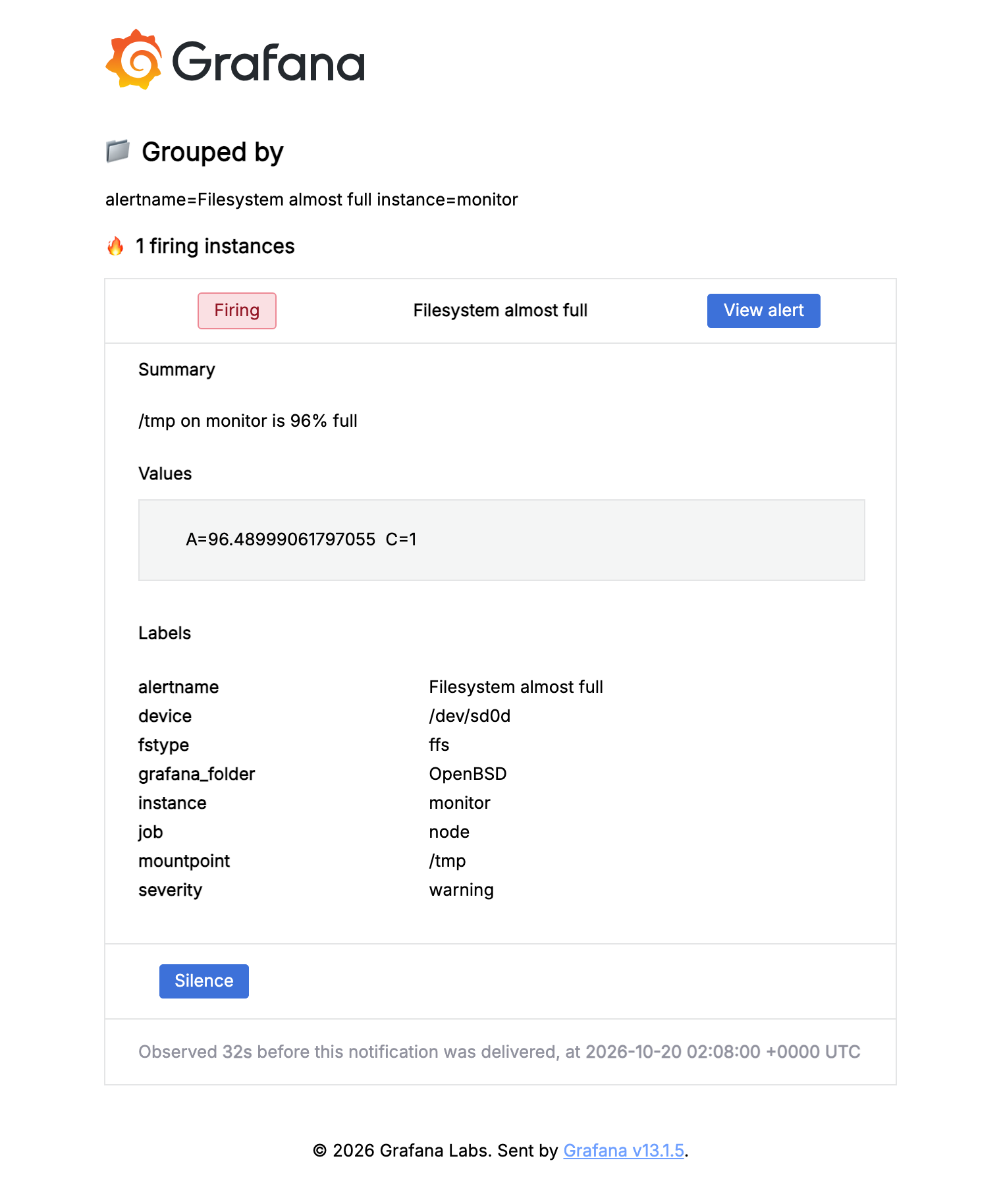
The View alert and Silence links point at http://localhost:3000, so they work while your SSH tunnel is up. If you later put Grafana behind a reverse proxy, set root_url under [server] so the links use that address.
You can watch the rules under Alerting → Alert rules in Grafana. Provisioned rules are read-only in the UI, so change thresholds in openbsd.yaml and restart Grafana. To mute an alert during planned work, add a silence under Alerting → Silences.
When an alert fires, open the dashboard for that host at the same time range. The other panels usually show why.
Monitoring more hosts
Install and enable node_exporter on the other host. Have it listen on an address the monitoring box can reach (--web.listen-address=192.0.2.20:9100), and use pf to allow port 9100 only from the monitoring box. Then add a target to /etc/vmetrics/scrape.yml:
      - targets: ['192.0.2.20:9100']
        labels:
          instance: web1
Then rcctl restart vmetrics. The new host appears in the dashboard's instance drop-down.
Security notes
- Each daemon runs as its own unprivileged user (
_nodeexporter,_vmetrics,_grafana), and with the setup above none of them is reachable from the network. - None of the three is chrooted, and the packaged binaries don't use pledge(2)/unveil(2). If one is compromised, that user can read anything world-readable on the host.
- VictoriaMetrics has no authentication of its own. Keep
-httpListenAddron localhost (or putvmetricsauth/ a reverse proxy in front) if anything else needs to reach it.
Upgrading
pkg_add -u
rcctl restart node_exporter vmetrics grafana
Your /etc/grafana/config.ini, /etc/vmetrics/scrape.yml, provisioning files and rc.conf.local flags are kept.